
Modules Reference: System
battery_simulator
Source: modules/simulation/battery_simulator
Опис
Використання
battery_simulator <command> [arguments...]
 Commands:
   start

   stop

   status        print status info
battery_status
Source: modules/battery_status
Опис
Надана функціональність включає в себе:
- Read the output from the ADC driver (via ioctl interface) and publish
battery_status.
Імплементація
Він запускається у власній темі і проводить опитування на поточну обрану тему гіроскопа.
Використання
battery_status <command> [arguments...]
 Commands:
   start

   stop

   status        print status info
camera_feedback
Source: modules/camera_feedback
Опис
The camera_feedback module publishes CameraCapture UORB topics when image capture has been triggered.
If camera capture is enabled, then trigger information from the camera capture pin is published; otherwise trigger information at the point the camera was commanded to trigger is published (from the camera_trigger module).
The CAMERA_IMAGE_CAPTURED message is then emitted (by streaming code) following CameraCapture updates. CameraCapture topics are also logged and can be used for geotagging.
Імплементація
CameraTrigger topics are published by the camera_trigger module (feedback field set false) when image capture is triggered, and may also be published by the camera_capture driver (with feedback field set true) if the camera capture pin is activated.
The camera_feedback module subscribes to CameraTrigger. It discards topics from the camera_trigger module if camera capture is enabled. For the topics that are not discarded it creates a CameraCapture topic with the timestamp information from the CameraTrigger and position information from the vehicle.
Використання
camera_feedback <command> [arguments...]
 Commands:
   start

   stop

   status        print status info
cdcacm_autostart
Source: drivers/cdcacm_autostart
Опис
Цей модуль прослуховує USB і автоматично налаштовує протокол в залежності від отриманих байтів. Підтримувані протоколи: MAVLink, nsh та ublox послідовний прохід. Якщо параметр SYS_USB_AUTO=2 модуль буде намагатися запустити mavlink лише тоді, коли буде виявлено USB VBUS. В іншому випадку він буде обертатися і продовжувати перевіряти VBUS та запускати mavlink, як тільки він виявиться.
Використання
cdcacm_autostart <command> [arguments...]
 Commands:
   start

   stop

   status        print status info
commander
Source: modules/commander
Опис
Модуль командира містить машину станів для перемикання режимів та аварійної поведінки.
Використання
commander <command> [arguments...]
 Commands:
   start
     [-h]        Enable HIL mode

   calibrate     Run sensor calibration
     mag|baro|accel|gyro|level|esc|airspeed Calibration type
     quick       Quick calibration [mag, accel (not recommended)]

   check         Run preflight checks

   arm
     [-f]        Force arming (do not run preflight checks)

   disarm
     [-f]        Force disarming (disarm in air)

   takeoff

   land

   transition    VTOL transition

   mode          Change flight mode
     manual|acro|offboard|stabilized|altctl|posctl|position:slow|auto:mission|au
                 to:loiter|auto:rtl|auto:takeoff|auto:land|auto:precland|ext1
                 Flight mode

   pair

   lockdown
     on|off      Turn lockdown on or off

   set_ekf_origin
     lat, lon, alt Origin Latitude, Longitude, Altitude

   lat|lon|alt   Origin latitude longitude altitude

   poweroff      Power off board (if supported)

   stop

   status        print status info
dataman
Source: modules/dataman
Опис
Модуль для забезпечення постійного сховища для решти системи у вигляді простої бази даних через C API. Multiple backends are supported depending on the board:
- файл (наприклад, на SD-карті)
- Оперативна пам'ять (очевидно, що вона не є постійною)
Використовується для зберігання структурованих даних різних типів: маршрутні точки місії, стан місії та полігони геозони. Кожен тип має певний тип і фіксовану максимальну кількість елементів зберігання, щоб забезпечити швидкий випадковий доступ.
Імплементація
Читання і запис одного елемента завжди атомарні.
Використання
dataman <command> [arguments...]
 Commands:
   start
     [-f <val>]  Storage file
                 values: <file>
     [-r]        Use RAM backend (NOT persistent)

 The options -f and -r are mutually exclusive. If nothing is specified, a file
 'dataman' is used

   stop

   status        print status info
dmesg
Source: systemcmds/dmesg
Опис
Інструмент командного рядка для показу повідомлень консолі завантаження. Зауважте, що вивід з робочих черг NuttX та syslog не перехоплюється.
Приклади
Продовжує друкувати всі повідомлення у фоновому режимі:
dmesg -f &Використання
dmesg <command> [arguments...]
 Commands:
     [-f]        Follow: wait for new messages
esc_battery
Source: modules/esc_battery
Опис
Це реалізує використання інформації зі статусу ESC і публікує її як стан батареї.
Використання
esc_battery <command> [arguments...]
 Commands:
   start

   stop

   status        print status info
gyro_calibration
Source: modules/gyro_calibration
Опис
Просте онлайн-калібрування гіроскопа.
Використання
gyro_calibration <command> [arguments...]
 Commands:
   start

   stop

   status        print status info
gyro_fft
Source: modules/gyro_fft
Опис
Використання
gyro_fft <command> [arguments...]
 Commands:
   start

   stop

   status        print status info
heater
Source: drivers/heater
Опис
Фоновий процес, що періодично запускається в робочій черзі LP для регулювання температури IMU на заданому рівні.
Це завдання можна запустити під час завантаження зі скриптів запуску, встановивши SENS_EN_THERMAL, або через CLI.
Використання
heater <command> [arguments...]
 Commands:
   start

   stop

   status        print status info
i2c_launcher
Source: systemcmds/i2c_launcher
Опис
Демон, який запускає драйвери на основі виявлених пристроїв I2C.
Використання
i2c_launcher <command> [arguments...]
 Commands:
   start
     -b <val>    Bus number

   stop

   status        print status info
internal_combustion_engine_control
Source: modules/internal_combustion_engine_control
Опис
The module controls internal combustion engine (ICE) features including: ignition (on/off), throttle and choke level, starter engine delay, and user request.
Enabling
This feature is not enabled by default needs to be configured in the build target for your board together with the rpm capture driver:
CONFIG_MODULES_INTERNAL_COMBUSTION_ENGINE_CONTROL=y
CONFIG_DRIVERS_RPM_CAPTURE=y
Additionally, to enable the module:
- Set ICE_EN to true and adjust the other
ICE_module parameters according to your needs. - Set RPM_CAP_ENABLE to true.
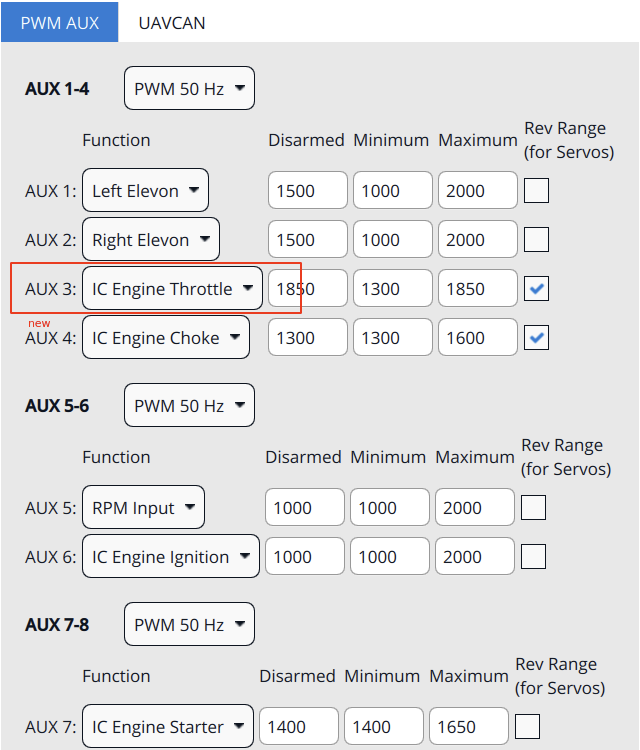
The module outputs control signals for ignition, throttle, and choke, and takes inputs from an RPM sensor. These must be mapped to AUX outputs/inputs in the Actuator configuration, similar to the setup shown below.
Імплементація
The ICE is implemented with a (4) state machine:
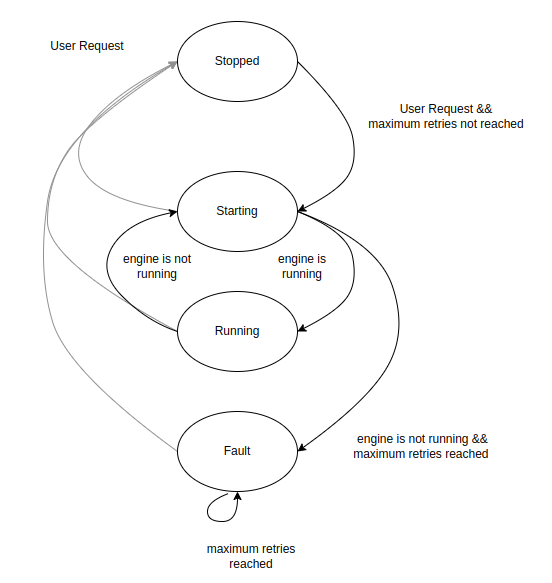
The state machine:
- Checks if Rpm.msg is updated to know if the engine is running
- Allows for user inputs from:
- AUX
- Arming state in VehicleStatus.msg
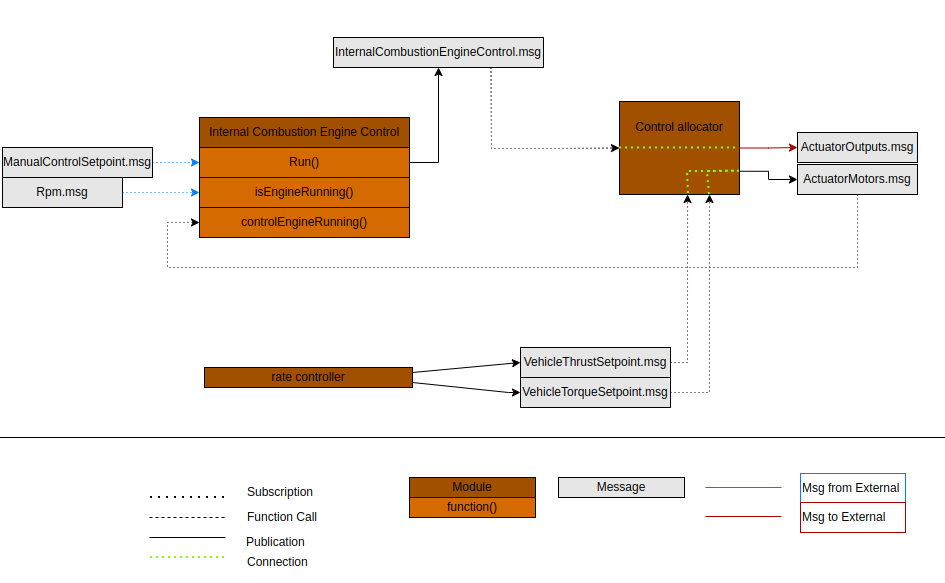
The module publishes InternalCombustionEngineControl.msg.
The architecture is as shown below:
Використання
internal_combustion_engine_control <command> [arguments...]
 Commands:
   start

   stop

   status        print status info
land_detector
Source: modules/land_detector
Опис
Module to detect the freefall and landed state of the vehicle, and publishing the vehicle_land_detected topic. Each vehicle type (multirotor, fixedwing, vtol, ...) provides its own algorithm, taking into account various states, such as commanded thrust, arming state and vehicle motion.
Імплементація
Кожен тип реалізовано у власному класі зі спільним базовим класом. Базовий клас підтримує стан (landed, maybe_landed, ground_contact). Кожен можливий стан реалізується в похідних класах. Гістерезис та фіксований пріоритет кожного внутрішнього стану визначає фактичний стан land_detector.
Мультикоптер Land Detector
ground_contact: thrust setpoint and velocity in z-direction must be below a defined threshold for time GROUND_CONTACT_TRIGGER_TIME_US. При виявленні контакту з землею регулятор положення вимикає задане значення тяги у тілі x та y.
maybe_landed: it requires ground_contact together with a tighter thrust setpoint threshold and no velocity in the horizontal direction. Час спрацьовування визначається параметром MAYBE_LAND_TRIGGER_TIME. Коли виявляється maybe_landed, контролер положення встановлює задане значення тяги на нуль.
landed: it requires maybe_landed to be true for time LAND_DETECTOR_TRIGGER_TIME_US.
Модуль періодично запускається у черзі робіт HP.
Використання
land_detector <command> [arguments...]
 Commands:
   start         Start the background task
     fixedwing|multicopter|vtol|rover|airship Select vehicle type

   stop

   status        print status info
load_mon
Source: modules/load_mon
Опис
Background process running periodically on the low priority work queue to calculate the CPU load and RAM usage and publish the cpuload topic.
У NuttX він також перевіряє використання стеку кожним процесом, і якщо воно падає нижче 300 байт, виводиться попередження, яке також буде показано у файлі логу.
Використання
load_mon <command> [arguments...]
 Commands:
   start         Start the background task

   stop

   status        print status info
logger
Source: modules/logger
Опис
System logger which logs a configurable set of uORB topics and system printf messages (PX4_WARN and PX4_ERR) to ULog files. Вони можуть бути використані для оцінки продуктивності системи та польоту, налаштування, відтворення та аналізу збоїв.
Він підтримує 2 бекенди:
- Файли: запис файлів ULog до файлової системи (SD-карта)
- MAVLink: передача даних ULog через MAVLink клієнту (клієнт повинен це підтримувати)
Обидва бекенди можуть бути активовані та використовуватися одночасно.
Файловий бекенд підтримує 2 типи логів: повний (звичайний лог) і журнал місій. Журнал місії - це скорочений файл ulog, який можна використовувати, наприклад, для географічних міток або управління транспортним засобом. Його можна увімкнути та налаштувати за допомогою параметра SDLOG_MISSION. Звичайний журнал завжди є підмножиною журналу місій.
Імплементація
Реалізація використовує два потоки:
- The main thread, running at a fixed rate (or polling on a topic if started with -p) and checking for data updates
- Потік запису, що записує дані у файл
Між ними знаходиться буфер запису з конфігурованим розміром (і ще один буфер фіксованого розміру для журналу місій). Він повинен бути великим, щоб уникнути втрати даних.
Приклади
Типове використання для початку ведення журналу негайно:
logger start -e -tАбо якщо вже працює:
logger onВикористання
logger <command> [arguments...]
 Commands:
   start
     [-m <val>]  Backend mode
                 values: file|mavlink|all, default: all
     [-x]        Enable/disable logging via Aux1 RC channel
     [-a]        Log 1st armed until shutdown
     [-e]        Enable logging right after start until disarm (otherwise only
                 when armed)
     [-f]        Log until shutdown (implies -e)
     [-t]        Use date/time for naming log directories and files
     [-r <val>]  Log rate in Hz, 0 means unlimited rate
                 default: 280
     [-b <val>]  Log buffer size in KiB
                 default: 12
     [-p <val>]  Poll on a topic instead of running with fixed rate (Log rate
                 and topic intervals are ignored if this is set)
                 values: <topic_name>
     [-c <val>]  Log rate factor (higher is faster)
                 default: 1.0

   on            start logging now, override arming (logger must be running)

   off           stop logging now, override arming (logger must be running)

   trigger_watchdog manually trigger the watchdog now

   stop

   status        print status info
mag_bias_estimator
Source: modules/mag_bias_estimator
Опис
Онлайн-оцінювач похибки магнітометра.
Використання
mag_bias_estimator <command> [arguments...]
 Commands:
   start         Start the background task

   stop

   status        print status info
manual_control
Source: modules/manual_control
Опис
Модуль споживає вхідні дані вручним керуванням, публікуючи одну установку керування вручну.
Використання
manual_control <command> [arguments...]
 Commands:
   start

   stop

   status        print status info
netman
Source: systemcmds/netman
Опис
Network configuration manager saves the network settings in non-volatile memory. On boot the update option will be run. Якщо конфігурація мережі не існує. Значення за замовчуванням буде збережено в неплавучій пам'яті та система перезавантажена.
update
netman update is run automatically by a startup script. When run, the update option will check for the existence of net.cfg in the root of the SD Card. It then saves the network settings from net.cfg in non-volatile memory, deletes the file and reboots the system.
save
The save option will save settings from non-volatile memory to a file named net.cfg on the SD Card filesystem for editing. Використовуйте це, щоб відредагувати налаштування. Збереження не негайно застосовує мережеві налаштування; користувач повинен перезавантажити стек польоту. By contrast, the update command is run by the start-up script, commits the settings to non-volatile memory, and reboots the flight controller (which will then use the new settings).
show
The show option will display the network settings in net.cfg to the console.
Приклади
$ netman save # Save the parameters to the SD card. $ netman show # відображення поточних налаштувань. $ netman update -i eth0 # зробити оновлення
Використання
netman <command> [arguments...]
 Commands:
   show          Display the current persistent network settings to the console.

   update        Check SD card for net.cfg and update network persistent network
                 settings.

   save          Save the current network parameters to the SD card.
     [-i <val>]  Set the interface name
                 default: eth0
pwm_input
Source: drivers/pwm_input
Опис
Вимірює вхід PWM на AUX5 (або MAIN5) через таймер захоплення ISR та публікує через повідомлення uORB 'pwm_input'.
Використання
pwm_input <command> [arguments...]
 Commands:
   start

   stop

   status        print status info
rc_update
Source: modules/rc_update
Опис
The rc_update module handles RC channel mapping: read the raw input channels (input_rc), then apply the calibration, map the RC channels to the configured channels & mode switches and then publish as rc_channels and manual_control_input.
Імплементація
Щоб зменшити затримку управління, модуль запланований на опублікування введення_управління.
Використання
rc_update <command> [arguments...]
 Commands:
   start

   stop

   status        print status info
replay
Source: modules/replay
Опис
Цей модуль використовується для відтворення файлів ULog.
There are 2 environment variables used for configuration: replay, which must be set to an ULog file name - it's the log file to be replayed. The second is the mode, specified via replay_mode:
replay_mode=ekf2: specific EKF2 replay mode. It can only be used with the ekf2 module, but allows the replay to run as fast as possible.- Generic otherwise: this can be used to replay any module(s), but the replay will be done with the same speed as the log was recorded.
Модуль зазвичай використовується разом з правилами видавця uORB, щоб вказати, які повідомлення потрібно відтворити. Модуль відтворення просто опублікує всі повідомлення, які знаходяться в журналі. Це також застосовує параметри з журналу.
The replay procedure is documented on the System-wide Replay page.
Використання
replay <command> [arguments...]
 Commands:
   start         Start replay, using log file from ENV variable 'replay'

   trystart      Same as 'start', but silently exit if no log file given

   tryapplyparams Try to apply the parameters from the log file

   stop

   status        print status info
send_event
Source: modules/events
Опис
Фоновий процес, що періодично виконується в черзі завдань LP для виконання рутинних завдань. Зараз він відповідає лише за сигнал тривоги на втрату RC.
Завдання можна почати через CLI або теми uORB (vehicle_command з MAVLink тощо).
Використання
send_event <command> [arguments...]
 Commands:
   start         Start the background task

   stop

   status        print status info
sensor_agp_sim
Source: modules/simulation/sensor_agp_sim
Опис
Module to simulate auxiliary global position measurements with optional failure modes for SIH simulation.
Використання
sensor_agp_sim <command> [arguments...]
 Commands:
   start

   stop

   status        print status info
sensor_arispeed_sim
Source: modules/simulation/sensor_airspeed_sim
Опис
Використання
sensor_arispeed_sim <command> [arguments...]
 Commands:
   start

   stop

   status        print status info
sensor_baro_sim
Source: modules/simulation/sensor_baro_sim
Опис
Використання
sensor_baro_sim <command> [arguments...]
 Commands:
   start

   stop

   status        print status info
sensor_gps_sim
Source: modules/simulation/sensor_gps_sim
Опис
Використання
sensor_gps_sim <command> [arguments...]
 Commands:
   start

   stop

   status        print status info
sensor_mag_sim
Source: modules/simulation/sensor_mag_sim
Опис
Використання
sensor_mag_sim <command> [arguments...]
 Commands:
   start

   stop

   status        print status info
sensors
Source: modules/sensors
Опис
Модуль сенсорів є центральним у всій системі. Він отримує вихід низького рівня від драйверів, перетворює його в більш придатну форму і публікує його для решти системи.
Надана функціональність включає в себе:
- Read the output from the sensor drivers (
SensorGyro, etc.). Якщо існують кілька екземплярів того самого типу, виконуйте голосування та обробку аварійної ситуації. Потім застосуйте обертання дошки та калібрування температури (якщо ввімкнено). And finally publish the data; one of the topics isSensorCombined, used by many parts of the system. - Make sure the sensor drivers get the updated calibration parameters (scale & offset) when the parameters change or on startup. Драйвери сенсора використовують інтерфейс ioctl для оновлення параметрів. For this to work properly, the sensor drivers must already be running when
sensorsis started. - Do sensor consistency checks and publish the
SensorsStatusImutopic.
Імплементація
Він запускається у власній темі і проводить опитування на поточну обрану тему гіроскопа.
Використання
sensors <command> [arguments...]
 Commands:
   start
     [-h]        Start in HIL mode

   stop

   status        print status info
system_power_simulation
Source: modules/simulation/system_power_simulator
Опис
Використання
system_power_simulation <command> [arguments...]
 Commands:
   start

   stop

   status        print status info
tattu_can
Source: drivers/tattu_can
Опис
Драйвер для зчитування даних з розумної батареї Tattu 12S 16000mAh.
Використання
tattu_can <command> [arguments...]
 Commands:
   start

   stop

   status        print status info
temperature_compensation
Source: modules/temperature_compensation
Опис
Модуль компенсації температури дозволяє всім гіроскопам, акселерометрам та барометрам у системі бути температурно компенсованими. Модуль відстежує дані, які надходять від датчиків та оновлює пов'язану тему sensor_correction кожного разу, коли виявляється зміна температури. Модуль також може бути налаштований для виконання обчислення коефіцієнта наступного завантаження, що дозволяє обчислити калібрувальні коефіцієнти теплової калібрації під час циклу температури автомобіля.
Використання
temperature_compensation <command> [arguments...]
 Commands:
   start         Start the module, which monitors the sensors and updates the
                 sensor_correction topic

   calibrate     Run temperature calibration process
     [-a]        calibrate the accel
     [-g]        calibrate the gyro
     [-m]        calibrate the mag
     [-b]        calibrate the baro (if none of these is given, all will be
                 calibrated)

   stop

   status        print status info
time_persistor
Source: modules/time_persistor
Опис
Writes the RTC time cyclically to a file and reloads this value on startup. This allows monotonic time on systems that only have a software RTC (that is not battery powered). Explicitly setting the time backwards (e.g. via system_time) is still possible.
Використання
time_persistor <command> [arguments...]
 Commands:
   start

   stop

   status        print status info
tune_control
Source: systemcmds/tune_control
Опис
Command-line tool to control & test the (external) tunes.
Мелодії використовуються для надання слухових сповіщень та попереджень (наприклад, коли система озброєна, отримує позицію блокування тощо). Інструмент вимагає, щоб був запущений драйвер, який може керувати темою управління tune_control uorb.
Інформацію про формат мелодії та попередньо визначені системні мелодії можна знайти тут: https://github.com/PX4/PX4-Autopilot/blob/main/src/lib/tunes/tune_definition.desc
Приклади
Грайте системний мелодію #2:
tune_control play -t 2Використання
tune_control <command> [arguments...]
 Commands:
   play          Play system tune or single note.
     error       Play error tune
     [-t <val>]  Play predefined system tune
                 default: 1
     [-f <val>]  Frequency of note in Hz (0-22kHz)
     [-d <val>]  Duration of note in us
     [-s <val>]  Volume level (loudness) of the note (0-100)
                 default: 40
     [-m <val>]  Melody in string form
                 values: <string> - e.g. "MFT200e8a8a"

   libtest       Test library

   stop          Stop playback (use for repeated tunes)
uxrce_dds_client
Source: modules/uxrce_dds_client
Опис
Клієнт UXRCE-DDS використовується для спілкування з агентом за допомогою тем uORB через послідовний або UDP.
Приклади
uxrce_dds_client start -t serial -d /dev/ttyS3 -b 921600
uxrce_dds_client start -t udp -h 127.0.0.1 -p 15555
Використання
uxrce_dds_client <command> [arguments...]
 Commands:
   start
     [-t <val>]  Transport protocol
                 values: serial|udp, default: udp
     [-d <val>]  serial device
                 values: <file:dev>
     [-b <val>]  Baudrate (can also be p:<param_name>)
                 default: 0
     [-h <val>]  Agent IP. If not provided, defaults to UXRCE_DDS_AG_IP
                 values: <IP>
     [-p <val>]  Agent listening port. If not provided, defaults to
                 UXRCE_DDS_PRT
     [-n <val>]  Client DDS namespace

   stop

   status        print status info
work_queue
Source: systemcmds/work_queue
Опис
Інструмент командного рядка для відображення статусу черги роботи.
Використання
work_queue <command> [arguments...]
 Commands:
   start

   stop

   status        print status info