
ARK CANnode
ARK CANnode is an open source generic DroneCAN node that includes a 6 degree of freedom IMU. Its main purpose is to enable the use of non-CAN sensors (I2C, SPI, UART) on the CAN bus. It also has PWM outputs to expand a vehicle's control outputs in quantity and physical distance.
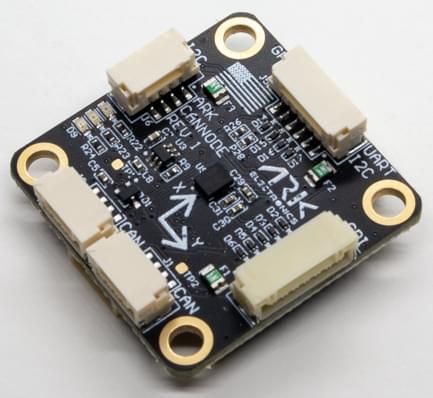
Where to Buy
Order this module from:
- ARK Electronics (US)
Hardware Specifications
- Open Source Schematic and BOM
- Sensors
- Bosch BMI088 6-Axis IMU or Invensense ICM-42688-P 6-Axis IMU
- STM32F412CGU6 MCU
- 1MB Flash
- Two Pixhawk Standard CAN Connectors
- 4 Pin JST GH
- Pixhawk Standard I2C Connector
- 4 Pin JST GH
- Pixhawk Standard UART/I2C Connector (Basic GPS Port)
- 6 Pin JST GH
- Pixhawk Standard SPI Connector
- 7 Pin JST GH
- PWM Connector
- 10 Pin JST JST
- 8 PWM Outputs
- Matches Pixhawk 4 PWM Connector Pinout
- Pixhawk Standard Debug Connector
- 6 Pin JST SH
- Small Form Factor
- 3cm x 3cm x 1.3cm
- LED Indicators
- USA Built
- Power Requirements
- 5V
- Current dependent on connected peripherals
Hardware Setup
Wiring
The ARK CANnode is connected to the CAN bus using a Pixhawk standard 4 pin JST GH cable. For more information, refer to the CAN Wiring instructions.
Firmware Setup
ARK CANnode runs the PX4 DroneCAN Firmware. As such, it supports firmware update over the CAN bus and dynamic node allocation.
ARK CANnode boards ship with recent firmware pre-installed, but if you want to build and flash the latest firmware yourself see PX4 DroneCAN Firmware > Building the Firmware.
- Firmware target:
ark_cannode_default - Bootloader target:
ark_cannode_canbootloader
Flight Controller Configuration
Enable DroneCAN
In order to use the ARK CANnode board, connect it to the Pixhawk CAN bus and enable the DroneCAN driver by setting parameter UAVCAN_ENABLE to 2 for dynamic node allocation (or 3 if using DroneCAN ESCs).
The steps are:
- In QGroundControl set the parameter UAVCAN_ENABLE to
2or3and reboot (see Finding/Updating Parameters). - Connect ARK CANnode CAN to the Pixhawk CAN.
Once enabled, the module will be detected on boot.
DroneCAN configuration in PX4 is explained in more detail in DroneCAN > Enabling DroneCAN.
Enable Sensors
You will need to enable the subscriber appropriate for each of the sensors that are connected to the ARK CANnode.
This is done using the the parameters named like UAVCAN_SUB_* in the parameter reference (such as UAVCAN_SUB_ASPD, UAVCAN_SUB_BARO etc.).
Ark CANNode Configuration
On the ARK CANnode, you may need to configure the following parameters:
| Parameter | Description |
|---|---|
| CANNODE_TERM | CAN built-in bus termination. |
LED Meanings
You will see both red and blue LEDs on the ARK CANnode when it is being flashed, and a solid blue LED if it is running properly.
If you see a solid red LED there is an error and you should check the following:
- Make sure the flight controller has an SD card installed.
- Make sure the ARK CANnode has
ark_cannode_canbootloaderinstalled prior to flashingark_cannode_default. - Remove binaries from the root and ufw directories of the SD card and try to build and flash again.