
Return Mode (Multicopter)

The Return flight mode is used to fly a vehicle to safety on an unobstructed path to a safe destination, where it can land.
Multicopters use a home/rally point return type by default. In this return type vehicles ascend to a safe altitude above obstructions if needed, fly directly to the closest safe landing point (a rally point or the home position), descend to the "descent altitude", wait briefly, and then land. The return altitude, descent altitude, and landing delay are normally set to conservative "safe" values, but can be changed if needed.
Multicopter supports the other PX4 return types, including mission landing, mission path and closest safe destination. The default type is recommended.
INFO
- Mode is automatic - no user intervention is required to control the vehicle.
- Mode requires a global 3d position estimate (from GPS or inferred from a local position).
- Flying vehicles can't switch to this mode without global position.
- Flying vehicles will failsafe if they lose the position estimate.
- Mode requires home position is set.
- Mode prevents arming (vehicle cannot be armed while this mode is selected).
- RC control switches can be used to change flight modes on any vehicle.
- RC stick movement will by default change the vehicle to Position mode unless prevented by the active failsafe state.
Technical Summary
Multicopters use the home/rally point return type by default (RTL_TYPE=0). For this return type the copter:
- Ascends to the minimum return altitude (safely above any expected obstacles). The vehicle maintains its initial altitude if that is higher than the minimum return altitude.
- Flies via a direct constant-altitude path to the safe landing point, which will be the nearest of any rally points and the home position.
- On arrival at its destination, it rapidly descends to the "descent altitude" (RTL_DESCEND_ALT).
- It waits for a configurable time (RTL_LAND_DELAY), which may be used for deploying landing gear.
- Then lands.
Minimum Return Altitude
By default the minimum return altitude is set using RTL_RETURN_ALT, and the vehicle will just return at the higher of RTL_RETURN_ALT or the initial vehicle altitude.
The minimum return altitude can be further configured using RTL_CONE_ANG and RTL_MIN_DIST, which together with RTL_RETURN_ALT define a half cone centered around the destination landing point. Within RTL_MIN_DIST of the destination, the return altitude is calculated from the cone geometry rather than set directly to RTL_RETURN_ALT, allowing a lower minimum return altitude when close to the destination. This is useful when there are few obstacles near the destination, as it may reduce the height the vehicle needs to ascend before landing, and hence power consumption and time to land.
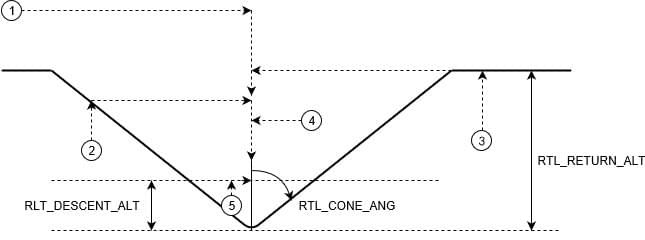
The cone affects the minimum return altitude if return mode is triggered within the cylinder defined by the maximum cone radius (RTL_MIN_DIST) and RTL_RETURN_ALT: outside this cylinder RTL_RETURN_ALT is used. Inside the cone, the vehicle returns at an altitude calculated from the cone geometry, up to RTL_RETURN_ALT. After reaching the destination, it descends to RTL_DESCEND_ALT (if above that altitude) before landing or loitering.
For more information on this return type see Home/Rally Point Return Type (RTL_TYPE=0)
Parameters
The RTL parameters are listed in Parameter Reference > Return Mode.
The parameters that are relevant to multicopter (assuming the RTL_TYPE is set to 0) are listed below.
| Parameter | Description |
|---|---|
| RTL_RETURN_ALT | Return altitude in meters (default: 60m) when RTL_CONE_ANG is 0. If already above this value the vehicle will return at its current altitude. |
| RTL_DESCEND_ALT | Altitude above the destination used for the final descent before landing or loitering (default: 30m). |
| RTL_LAND_DELAY | Time to hover at RTL_DESCEND_ALT before landing (default: 0.5s) - by default this period is short so that the vehicle will simply slow and then land immediately. If set to -1 the system will loiter at RTL_DESCEND_ALT rather than landing. The delay is provided to allow you to configure time for landing gear to be deployed (triggered automatically). |
| RTL_MIN_DIST | Within this distance from the home position, the return altitude is calculated from the "cone" rather than directly from RTL_RETURN_ALT. |
| RTL_CONE_ANG | Half-angle of the cone that defines the vehicle RTL return altitude. Values (in degrees): 0, 25, 45, 65, 80, 90. Note that 0 is "no cone" (always return at RTL_RETURN_ALT or higher), while 90 indicates an almost vertical cone, so the vehicle generally returns at its current altitude when close to the destination. The return altitude may still be constrained to avoid flying too low while approaching the destination. |
| COM_RC_OVERRIDE | Controls whether stick movement on a multicopter (or VTOL in MC mode) causes a mode change to Position mode (unless prevented by the active failsafe state). This can be separately enabled for auto modes and for offboard mode, and is enabled in auto modes by default. |
| COM_RC_STICK_OV | The amount of stick movement that causes a transition to Position mode (if COM_RC_OVERRIDE is enabled). |