
标准配置
This section covers the common software configuration and calibration needed for most PX4 vehicles.
You must first load firmware and select your vehicle frame/type. Most other steps can be done out of order, except for tuning, which must be done last.
Preconditions
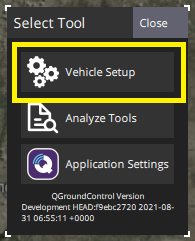
Before starting you should Download QGroundControl and install it on your desktop computer. Then open the QGC application menu ("Q" icon in the top-left corner) and choose Vehicle Setup in the Select Tool popup:
Configuration Steps
Firmware/Vehicle Selection
Motor/Actuator Setup
Sensor Calibration
- 传感器方向
- 罗盘
- 陀螺仪
- 加速度计 Accelerometer
- Level Horizon
- Airspeed (Fixed-wing/VTOL only)
Setup for these and other sensors is located in Sensor Hardware & Setup.
Manual Control Setup
Radio Control:
Joystick/GamePad:
Safety Configuration
Tuning
- Autotune (Recommended on vehicles and frames that support it)
视频教程
The video below shows most of the calibration process (it uses an older version of QGroundControl, but most of the process is unchanged).
Support
If you need help with the configuration you can ask for help on the QGroundControl Support forum.
See Also
Flight Controller Peripherals - Setup specific sensors, optional sensors, actuators, and so on.
Advanced Configuration - Factory/OEM calibration, configuring advanced features, less-common configuration.
Vehicle-Centric Config/Tuning: