
Hold Mode (Fixed-Wing)

The Hold flight mode causes the vehicle to loiter around its current GPS position and maintain its current altitude.
The mode supports a number of distinct loiter modes, which are triggered using different QGC controls or MAVLink commands. These allow loitering with circular and figure 8 flight paths.
TIP
Hold mode can be used to pause a mission or to help you regain control of a vehicle in an emergency. It is usually activated with a pre-programmed RC switch.
INFO
- Mode is automatic - no user intervention is required to control the vehicle.
- Mode requires a global 3d position estimate (from GPS or inferred from a local position).
- Flying vehicles can't switch to this mode without global position.
- Flying vehicles will failsafe if they lose the position estimate.
- Disarmed vehicles can switch to mode without valid position estimate but can't arm.
- Mode requires wind and flight time are within allowed limits (specified via parameters).
- RC control switches can be used to change flight modes on any vehicle.
- RC stick movement is ignored.
Loiter modes
Default Loiter
The aircraft circles around the position at which the mode was triggered and maintain its current altitude. The loiter radius is set by the parameter NAV_LOITER_RAD. Note that if the vehicle altitude is below NAV_MIN_LTR_ALT, it will ascend to that minimum altitude before circling.
The default loiter mode is entered when you switch to Hold mode without explicitly specifying any loiter behaviour. For example, if you switch to Hold mode using an RC switch, select Hold on the QGC flight mode selector, or activate the mode using the MAVLink MAV_CMD_DO_SET_MODE command.
Orbit Loiter Mode
PX4 v1.12The aircraft travels towards a specified orbit center position, then circles it with a given direction and radius.
This behaviour can be accessed in QGroundControl by clicking on the map in Fly view, selecting Orbit at Location, and configuring the radius.
The behavior can be triggered using the MAVLink MAV_CMD_DO_ORBIT command. Note that PX4 respects the specified centre point (param5, param6, param7), and the radius and direction (param1). PX4 ignores param3 (Yaw behaviour) and param4 (Orbits). The value of param2 (velocity) is also ignored, but the speed can be controlled using the MAV_CMD_DO_CHANGE_SPEED command (constrained between FW_AIRSPD_MAX and FW_AIRSPD_MIN). PX4 outputs orbit status using the ORBIT_EXECUTION_STATUS message.
Figure 8 Loiter Mode
PX4 v1.15 ExperimentalThe aircraft flys towards the closest point on a specified figure 8 path and then follows it. The path is defined by the figure 8 centre position, orientation, and radius of two circles.
The feature is experimental, and is not present in PX4 firmware by default (on most flight controller boards). It can be included by setting the CONFIG_FIGURE_OF_EIGHT key in the PX4 board configuration for your board and rebuilding. For example, this is enabled on the default.px4board file for the auterion/fmu-v6s board.
The behavior can be triggered using the MAVLink MAV_CMD_DO_FIGURE_EIGHT command (PX4 respects all the parameters). PX4 outputs the figure 8 status using the FIGURE_EIGHT_EXECUTION_STATUS message.
INFO
Figure 8 loitering is not currently supported by QGC: QGC#12778: Need Support Figure of eight (8 figure) loitering by QGC.
Figure 8 loitering is also available in the simulator. You can test it in Gazebo using a fixed wing frame:
make px4_sitl gz_rc_cessnaAltitude Ramp on Reposition (Go-to)
When you command the vehicle to a new loiter location at a different altitude — for example a QGroundControl Go to location / reposition while in Hold mode — PX4 does not change the altitude setpoint in a single step. Instead it ramps the altitude setpoint linearly (a first order hold, FOH) from the vehicle's current altitude to the new target altitude, reaching the target by the time the vehicle arrives at the loiter circle around the new location. The result is a smooth diagonal climb or descent along the transit to the new location, rather than an immediate climb/descent followed by level flight.
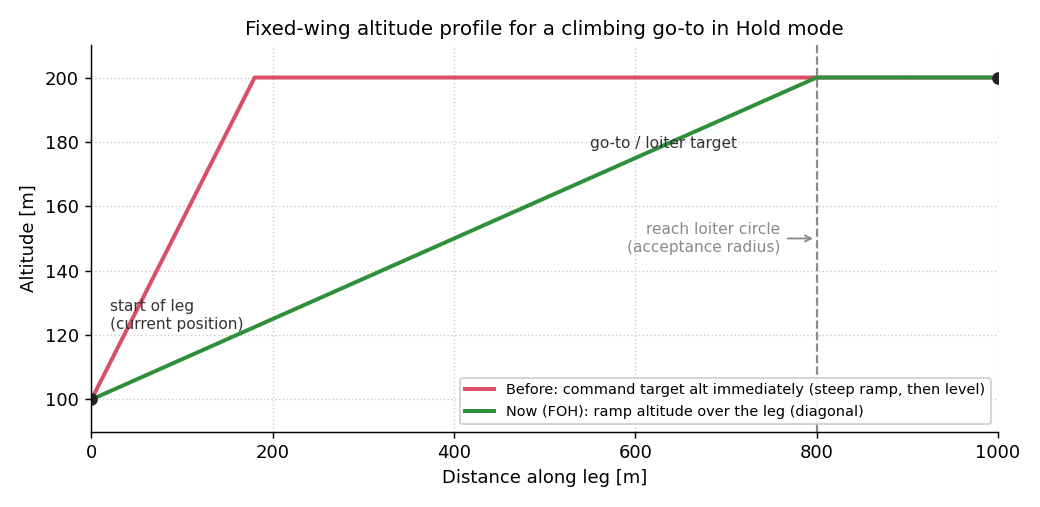
The ramp is anchored at the altitude the vehicle is at when the new target is received, and its progress is measured by the vehicle's horizontal approach to the target (not by time).
If the vehicle cannot follow the ramp (for example when the required climb or sink rate exceeds what the aircraft can achieve), the altitude setpoint still reaches the full target altitude at the loiter circle. Any remaining altitude error is then removed by climbing or sinking once the vehicle reaches the horizontal position of the new location.
INFO
The ramp is (re)started whenever the target altitude changes; a reposition that keeps the same altitude does not change the vehicle's altitude.
Mode Requirements
The following requirements must be met to arm in this mode, or to switch to this mode when it is armed.
mode_req_angular_velocity— Angular velocitymode_req_attitude— Attitude/posemode_req_global_position_relaxed— Position measurement updates in a global coordinate frame but accepts poor accuracymode_req_local_alt— Local altitude relative to EKF2 origin ('0') positionmode_req_local_position_relaxed— Position relative to EKF2 origin ('0') point but accepts poor accuracymode_req_wind_and_flight_time_compliance— Safety compliance limits on wind and flight time.
Parameters
Hold mode behaviour can be configured using the parameters below.
| Parameter | Description |
|---|---|
| NAV_LOITER_RAD | The radius of the loiter circle. |
| NAV_MIN_LTR_ALT | Minimum height for loiter mode (vehicle will ascend to this altitude if mode is engaged at a lower altitude). |
MAVLink Commands
The following commands are relevant to this mode:
- MAV_CMD_DO_ORBIT - Switch to Hold mode and start the specified Orbit loiter. Params 2 (velocity), 3 (yaw), 4 (orbits) are ignored. ORBIT_EXECUTION_STATUS is emitted.
- MAV_CMD_DO_FIGURE_EIGHT - Switch to Hold mode and start the specified Figure 8 loiter. All params are respected. FIGURE_EIGHT_EXECUTION_STATUS is emitted.
Note, other commands may be supported.