
Airspeed Sensors
Airspeed sensors are highly recommended for fixed-wing and VTOL frames. They are so important because the autopilot does not have other means to detect stall. For fixed-wing flight it is the airspeed that guarantees lift — not ground speed!
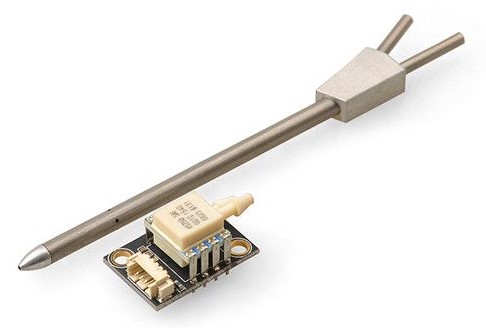
Hardware Options
Recommended digital airspeed sensors include:
- Based on Pitot tube
- I2C MEAS Spec series (e.g. MS4525DO, MS5525)
- I2C Sensirion series (e.g. SDP33)
- I2C Amphenol All Sensors Digital Low Voltage R-Series (DLVR) Pressure Sensors. Continuous-sampling sensors only (see for SENS_EN_DLVR for supported sensors).
- DroneCAN interface
- Based on Venturi effect
- TFSLOT Venturi effect airspeed sensor.
Configuration
Enable Airspeed Sensors
Airspeed sensor drivers are not started automatically. Enable each driver and/or variant using its corresponding parameter:
- Sensirion SDP3X — SENS_EN_SDP3X
- TE MS4525 — SENS_EN_MS4525DO
- TE MS5525 — SENS_EN_MS5525DS
- Eagle Tree airspeed sensor: — SENS_EN_ETSASPD
- Amphenol All Sensors DLVR (continuous-sampling sensors only) — SENS_EN_DLVR
You should also check ASPD_PRIMARY is 1 (see next section - this is the default).
Multiple Airspeed Sensors
main (PX4 v2.0) ExperimentalExperimental
Using multiple airspeed sensors is experimental.
PX4 supports up to three airspeed sensors. Each sensor is converted to airspeed independently, keeps its own zero-offset calibration, and is validated separately, so the selector can fall back to a healthy sensor if one fails in flight.
Selecting the Primary Sensor
ASPD_PRIMARY selects the source that is preferred:
0: Groundspeed minus windspeed1: Airspeed sensor 1 (default)2: Airspeed sensor 23: Airspeed sensor 34: Thrust-based (synthetic) airspeed
The sensor numbers 1, 2 and 3 refer to the calibration entry the sensor owns (recorded in CAL_DPRES{n-1}_ID).
TIP
Calibrate every sensor before relying on ASPD_PRIMARY.
Failover
The preferred sensor is used while it passes the airspeed checks (ASPD_DO_CHECKS configures which checks run). If it fails, the selector switches to another valid sensor, preferring the configured primary.
ASPD_FALLBACK controls what happens when no sensor is usable: stay without airspeed, fall back to groundspeed minus windspeed, or fall back to thrust-based airspeed.
WARNING
By default a sensor that fails its checks stays failed until the next reboot (ASPD_FS_T_START is -1). Set it to a positive number of seconds to allow a recovered sensor to be used again in the same flight.
The selected sensor is then used to supply data to the estimator (EKF2) and the controllers.
Per-Sensor Calibration
Each sensor stores its own zero offset in CAL_DPRES{n}_OFF, linked to the sensor's device ID in CAL_DPRES{n}_ID. A single airspeed calibration calibrates every connected sensor.
Sensor-specific Configuration
Other than enabling the sensor, sensor-specific configuration is often not required. If it is needed, it should be covered in the appropriate sensor page (for example TFSLOT > Configuration).
The specific configuration for sensors that do not have a separate page is listed below:
- Sensirion SDP3X: CAL_AIR_CMODEL (provides overview of required settings), CAL_AIR_TUBED_MM, CAL_AIR_TUBELEN.
Calibration
Airspeed sensors should be calibrated by following the instructions: Basic Configuration > Airspeed.
Validation
For more advanced validation, configuration and debugging see Airspeed Validation.