
AirPixel TAG-E (Sony ILX-LR1 Camera Control and Geotagging)
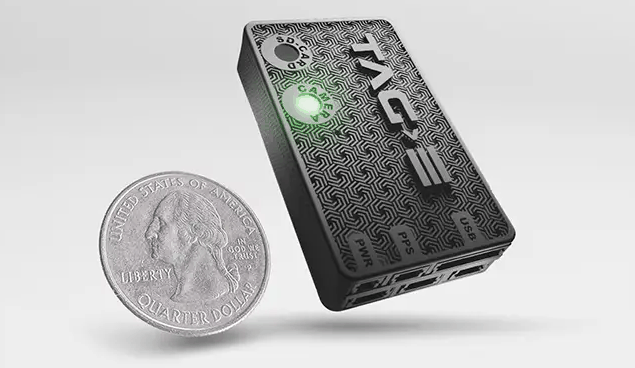
The AirPixel TAG-E is a camera controller and EXIF/XMP geotagger for the Sony ILX-LR1. It connects to the camera with a single USB-C cable and to PX4 over MAVLink, and acts as a MAVLink camera using Camera Protocol v2.
QGroundControl detects the camera automatically and shows its shutter, video, exposure and configuration controls. TAG-E writes position, altitude and camera attitude into the EXIF and XMP of every photo on the camera's SD card during the flight, so no log-based geotagging is needed afterwards.
Key Features
- Full MAVLink Camera Protocol v2 control of the Sony ILX-LR1 (ISO, aperture, shutter speed, exposure compensation, exposure mode, AF mode, photo/video).
- Automatic EXIF and XMP geotagging with position, altitude and camera roll/pitch/yaw, at the camera's full trigger rate.
- Clock synchronisation with the flight controller using the MAVLink TIMESYNC protocol.
- Lever-arm correction from antenna-to-camera offsets, optional rangefinder, GPS/IMU accuracy and custom label tags, PPK output, and video geotagging via subtitles.
- Camera clock set automatically from GPS time.
Wiring
Connect TAG-E's IO-B connector to an unused serial port on the flight controller, such as TELEM2, and TAG-E's USB-C port to the camera. TAG-E needs a 5V supply able to deliver at least 2A.
Pinouts are in the TAG-E pinout manual.
PX4 Configuration
TAG-E uses the component ID MAV_COMP_ID_CAMERA (100). Configure an unused MAVLink instance for the port it is connected to. The table below shows the settings for TELEM2 using the MAV_1_* parameters (if using another port or instance, set the corresponding unused MAV_n_* parameters and the baud rate parameter for that port):
| Parameter | Value |
|---|---|
| MAV_1_CONFIG | TELEM 2 |
| SER_TEL2_BAUD | 921600 |
| MAV_1_MODE | Onboard |
| MAV_1_RATE | 0 |
| MAV_1_FORWARD | Enabled |
Reboot the flight controller. When the camera is online, the TAG-E LED turns green and the camera panel appears in QGroundControl.
TAG-E requests the messages it needs using MAV_CMD_SET_MESSAGE_INTERVAL: SYSTEM_TIME at 1Hz, ATTITUDE at 10Hz, and GPS_RAW_INT and GLOBAL_POSITION_INT at a rate that depends on its configuration. It also uses the TIMESYNC protocol to synchronise its clock with the flight controller.
TIP
TAG-E units with firmware older than 0_193 use 230400 baud. See the manufacturer's PX4 connection manual for changing the baud rate, and the GPS delay calculation for the best geotag accuracy.
Camera Control in QGroundControl
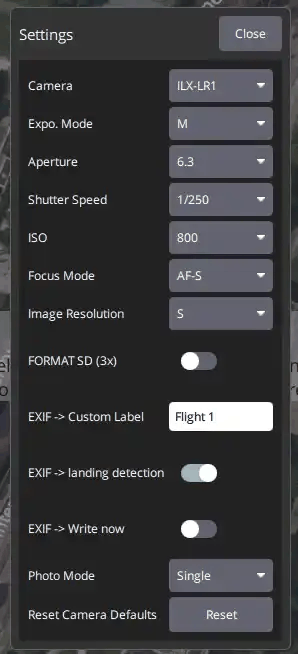
When the camera is online, QGroundControl shows the camera panel on the right of the Fly view: the shutter button, a photo/video switch, and the photo count or recording time. The gear icon under the shutter button opens the camera settings: exposure mode, aperture, shutter speed, ISO, focus mode and image resolution, plus TAG-E functions such as remote SD card format, a custom EXIF label, landing detection and photo mode.
Triggering
PX4 re-emits the image and video capture commands in missions (MAV_CMD_IMAGE_START_CAPTURE, MAV_CMD_IMAGE_STOP_CAPTURE, MAV_CMD_VIDEO_START_CAPTURE, MAV_CMD_VIDEO_STOP_CAPTURE) to MAV_COMP_ID_CAMERA, so they reach TAG-E directly. The camera can also be triggered from the QGroundControl camera panel.