
Agam FloRange
main (PX4 v2.0)WARNING
PX4 does not manufacture this (or any) autopilot component. Contact the manufacturer for hardware support or compliance issues.
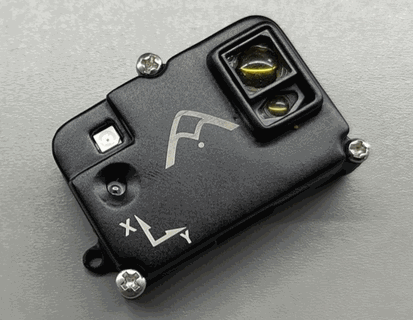
Agam FloRange is Agam Robotics' DroneCAN optical flow, distance sensor, and IMU module. Its primary use is to provide local positioning in the absence of global positioning devices such as GNSS modules, as well as to improve stability.
Where to Buy
Order this module from:
Hardware Specifications
- Sensors
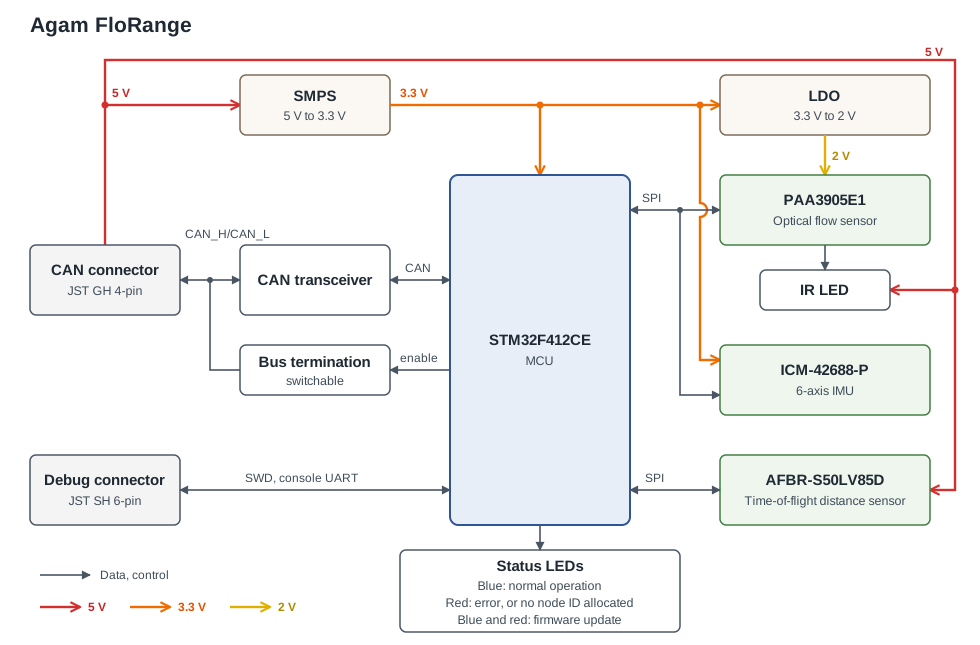
- PixArt PAA3905E1 Optical Flow Sensor
- Wide working distance from 80mm to infinity, no calibration required
- Supports synchronised multi-chip operation and automatic mode switching
- Broadcom AFBR-S50LV85D Time-of-Flight Distance Sensor (datasheet)
- Integrated 850nm laser light source, Laser Class 1 eye safe
- Receiver Field-of-View (FoV) of 12.4° x 5.4° with 32 pixels, 1.55° x 1.55° each
- Transmitter (laser) beam of 2° x 2°, illuminating 1 to 3 pixels
- Typical distance range up to 30m
- Operates in up to 200k lux ambient light
- Sensor supply: 5V, typically 33mA
- InvenSense ICM-42688-P 6-Axis IMU
- IR LED for low-light operation
- PixArt PAA3905E1 Optical Flow Sensor
- STM32F412CE MCU
- Single Pixhawk Standard CAN Connector (4 Pin JST GH)
- Software-switchable built-in CAN termination
- Pixhawk Standard Debug Connector (6 Pin JST SH)
- 5V supply from the CAN connector
- Small Form Factor: 44.95mm x 29.4mm x 15.59mm
- Weight: 9.38g (including enclosure)
- Designed and manufactured in India
Hardware Setup
Wiring
Connect Agam FloRange to the flight controller's CAN bus with the provided cable. For more information, refer to the CAN Wiring instructions.
INFO
Agam FloRange has a single CAN connector, so it is normally the last node on the bus. Enable its built-in termination by setting CANNODE_TERM to 1. If more than one module is connected through a CAN splitter, enable termination only on the module furthest from the flight controller.
| Pin | Signal | Wire |
|---|---|---|
| 1 | VCC (+5V) | Red |
| 2 | CAN_H | Black |
| 3 | CAN_L | Black |
| 4 | GND | Black |
Twist the VCC/GND and CAN_H/CAN_L wires as pairs to reduce electromagnetic interference and crosstalk, as described in Cable Wiring Basics > UAVCAN cables.
Mounting
Mount the module with the sensors facing down and the X arrow on the enclosure pointing towards the front of the vehicle. This corresponds to the default value (0) of the parameter SENS_FLOW_ROT. Change the parameter appropriately if using a different orientation.
Firmware Setup
Agam FloRange runs the PX4 DroneCAN Firmware. It supports firmware updates over the CAN bus and dynamic node allocation. Firmware can also be flashed over SWD using the Pixhawk Debug Mini connector, which additionally provides the System Console. Agam FloRange ships with recent firmware pre-installed, but if you want to build and flash the latest firmware yourself, see PX4 DroneCAN Firmware > Building the Firmware.
- Firmware target:
agam_florange_default - Bootloader target:
agam_florange_canbootloader
PX4 Configuration
INFO
Agam FloRange will not boot if the flight controller has no SD card installed when it is powered on.
Enable DroneCAN
The steps are:
- In QGroundControl set the parameter UAVCAN_ENABLE to
2for dynamic node allocation (or3if also using DroneCAN ESCs) and reboot (see Finding/Updating Parameters). - Connect Agam FloRange to the flight controller's CAN bus (see Wiring).
Once DroneCAN is enabled, the module is detected on boot.
DroneCAN configuration in PX4 is explained in more detail in DroneCAN > Enabling DroneCAN.
Flow and Rangefinder Parameters
Set the following parameters in QGroundControl, depending on which functions of the module you use:
- Enable optical flow fusion with EKF2_OF_CTRL (enabled by default).
- To optionally disable GPS aiding, set EKF2_GPS_CTRL to
0. - Enable UAVCAN_SUB_FLOW.
- Enable UAVCAN_SUB_RNG.
- Set UAVCAN_RNG_MIN to
0.08, the minimum working distance of the flow sensor, and UAVCAN_RNG_MAX to30, the maximum range of the distance sensor. - If using the distance sensor for height aiding, enable EKF2_RNG_CTRL and set EKF2_RNG_A_HMAX to
10and EKF2_RNG_QLTY_T to0.2. - Set SENS_FLOW_MINHGT to
0.08, the minimum height of the flow sensor, and SENS_FLOW_MAXHGT to30, the maximum range of the distance sensor. - Set SENS_FLOW_MAXR to
7.4to match the PAA3905 maximum angular flow rate. - The parameters EKF2_OF_POS_X, EKF2_OF_POS_Y, EKF2_OF_POS_Z and EKF2_RNG_POS_X, EKF2_RNG_POS_Y, EKF2_RNG_POS_Z can be set to account for the offset of the module from the vehicle centre of gravity.
When optical flow is the only source of horizontal position/velocity, reduce the horizontal position gain MPC_XY_P (for example to 0.5) to reduce oscillations.
Agam FloRange Configuration
On the module, you may need to configure the following parameters:
| Parameter | Description |
|---|---|
| CANNODE_NODE_ID | CAN node ID. Set to 0 (default) for dynamic node allocation, or to 1-125 for a static node ID. |
| CANNODE_TERM | Built-in CAN bus termination. Set to 1 if the module is the last node on the CAN bus (see Wiring). |
LED Meanings
- Solid blue indicates normal operation.
- Solid blue and red (both on) indicates a firmware update.
- Solid red indicates an error, or that the module is waiting for a node ID to be allocated (briefly, on every boot).
If the red LED stays on, there is an error and you should check the following:
- Make sure the flight controller has an SD card installed.
- Make sure Agam FloRange has
agam_florange_canbootloaderinstalled prior to flashingagam_florange_default. - Remove binaries from the root and
ufwdirectories of the SD card and try to build and flash again.