
Логування
The system logger is able to log any ORB topic with all included fields. Everything necessary is generated from the .msg file, so that only the topic name needs to be specified. Необов'язковий параметр інтервалу визначає максимальну швидкість ведення журналу певної теми. Усі існуючі екземпляри теми реєструються.
The output log format is ULog.
Encrypted logging is also supported.
Використання
За замовчуванням, реєстрація автоматично починається при взбиранні на охорону, і зупиняється при знятті з охорони. Для кожної сесії готовності на SD-картці створюється новий файл журналу. To display the current state, use logger status on the console. If you want to start logging immediately, use logger on. Це скасовує стан готовності, якщо система була увімкнена. logger off stops the current log. Logging can start again on the next arming or AUX activation according to SDLOG_MODE. If logger off stops a continuous log (SDLOG_MODE=2 or 4), the next arming starts a new log that continues until shutdown.
If logging stops due to a write error, or reaching the maximum file size, PX4 will automatically restart logging in a new file.
Для отримання списку всіх підтримуваних команд та параметрів реєстратора використовуйте:
logger helpНалаштування
The logging system is configured by default to collect sensible logs for flight reporting with Flight Review.
Logging may further be configured using the SD Logging parameters. Параметри, які ви найімовірніше зміните, перераховані нижче.
| Parameter | Опис |
|---|---|
| SDLOG_MODE | Журналювання. Defines when logging starts and stops. - 0: Log when armed until disarm (default).- 1: Log from boot until disarm.- 2: Log from boot until shutdown.- 3: Log based on the AUX1 RC channel.- 4: Log from first armed until shutdown. |
| SDLOG_BACKEND | Logging Backend (bitmask). Setting a bit enables the corresponding backend. If no backend is selected, the logger is disabled. - bit 0: SD card logging.- bit 1: Mavlink logging. |
| SDLOG_PROFILE | Профіль ведення журналу. Use this to enable less common logging/analysis (e.g. for EKF2 replay, high rate logging for PID & filter tuning, thermal temperature calibration). |
| SDLOG_MISSION | Create very small additional "Mission Log". This log can not be used with Flight Review, but is useful when you need a small log for geotagging or regulatory compliance. |
Корисні налаштування для конкретних випадків:
- Raw sensor data for comparison: SDLOG_MODE=1 and SDLOG_PROFILE=64.
- Disabling logging altogether: SDLOG_BACKEND=
0
Модуль реєстрації
Developers can further configure what information is logged via the logger module. Це дозволяє, наприклад, реєструвати ваші власні теми uORB.
Конфігурація SD-карти
The list of logged topics can also be customized with a file on the SD card: etc/logging/logger_topics.txt (for SITL, it's build/px4_sitl_default/rootfs/etc/logging/logger_topics.txt).
Each topic to be logged is listed on a separate line, with the following format:
<topic_name> <interval> <instance>Де:
<interval>(optional). Defines the minimum interval in ms between two logged messages of this topic. If not specified or0, the topic is logged at full rate.<instance>(optional). Defines the instance to log. NOte that<interval>must be specified in order to setinstanceЯкщо не вказано, всі екземпляри теми реєструються.
The topics in this file will be added on top of the already selected topics. To just log the topics defined in this file, set SDLOG_PROFILE=0. If a topic is already included, it will update it's rate.
Приклади :
sensor_accel 0 0
sensor_accel 100 1
sensor_gyro 200
sensor_mag 200 1
This configuration will log sensor_accel 0 at full rate, sensor_accel 1 at 10Hz, all sensor_gyro instances at 5Hz and sensor_mag 1 at 5Hz.
Скрипти
There are several scripts to analyze and convert logging files in the pyulog repository.
Log Cleanup
PX4 automatically manages log storage by rotating log files during writing and cleaning up old logs when starting a new log. Rotation is on by default: when the current file reaches SDLOG_MAX_SIZE, the logger closes it and opens a new one, and old .ulg files are deleted (oldest first) to keep free space above the threshold set by SDLOG_ROTATE.
Three parameters control how much space logs may use:
- SDLOG_ROTATE is the maximum disk usage percentage (default 90). Cleanup prior to logging (see below) ensures at least
(100 - SDLOG_ROTATE)%of the disk stays free at all times, even while writing a new log file. Setting it to0disables space-based cleanup entirely; setting it to100lets logs fill the disk completely. - SDLOG_MAX_SIZE is the maximum size of a single log file in MB (default 1024). It also reserves headroom so that a full new file always fits after cleanup.
- SDLOG_DIRS_MAX optionally caps the number of log directories kept (default 0, disabled). This runs on top of the space-based cleanup and is mainly useful for capping log usage by count independent of available disk size (e.g. in SITL, where it defaults to
7).
At log start, the cleanup threshold is ((100 - SDLOG_ROTATE)% of disk) + SDLOG_MAX_SIZE. The oldest logs are deleted until the free space meets this threshold. For example, on an 8 GB card with defaults, cleanup keeps at least 820 + 1024 = ~1.8 GB free at log start, so ~6 GB is usable for logs and disk usage never exceeds 90% during writing. Small flash targets override SDLOG_MAX_SIZE to a smaller value to keep more logs within the available space.
PX4 stores logs in directories named with one of two formats, depending on whether the system has valid time: date directories (such as 2024-01-15 or 2024-01-16) when it does, and session directories (sess001) when it doesn't. The cleanup algorithm prioritises deleting logs from whichever format is not currently in use. This ensures that stale logs from a different time mode are cleaned up before current logs.
Обмеження розміру файлу
Максимальний розмір файлу залежить від файлової системи та ОС. The size limit on NuttX is currently around 4GB.
Відключення
Втрати логування небажані, і є кілька факторів, що впливають на кількість втрат:
- Більшість SD-карт, які ми тестували, проявляють кілька пауз кожну хвилину. Це проявляється як кілька 100 мс затримка під час команди запису. Це призводить до відключення, якщо буфер запису заповнюється протягом цього часу. Цей ефект залежить від SD-карти (див. нижче).
- Форматування SD-карти може допомогти у запобіганні викидань.
- Збільшення буфера журналу допомагає.
- Decrease the logging rate of selected topics or remove unneeded topics from being logged (
info.py <file>is useful for this).
SD-карти
Максимальний підтримуваний розмір SD-карти для NuttX - 32 ГБ (Специфікація карт пам’яті SD, версія 2.0). The SanDisk Extreme U3 32GB and Samsung EVO Plus 32 are known to be reliable cards (do not exhibit write-time spikes, and thus virtually no dropouts).
The table below shows the mean sequential write speed [KB/s] / maximum write time per block (average) [ms] for F4- (Pixracer), F7-, and H7-based flight controllers.
| SD-карта | F4 | F7 | H7 |
|---|---|---|---|
| SanDisk Extreme U3 32GB | 1500 / 15 | 1800/10 | 2900/8 |
| Samsung EVO Plus 32GB | 1700/10-60 | 1800/10-60 | 1900/9-60 |
| Sandisk Ultra Class 10 8GB | 348 / 40 | ?/? | ?/? |
| Sandisk Class 4 8GB | 212 / 60 | ?/? | ?/? |
| SanDisk Class 10 32 GB (High Endurance Video Monitoring Card) | 331 / 220 | ?/? | ?/? |
| Lexar U1 (Class 10), 16GB High-Performance | 209 / 150 | ?/? | ?/? |
| Sandisk Ultra PLUS Class 10 16GB | 196 /500 | ?/? | ?/? |
| Sandisk Pixtor Class 10 16GB | 334 / 250 | ?/? | ?/? |
| Sandisk Extreme PLUS Class 10 32GB | 332 / 150 | ?/? | ?/? |
Запис пропускної здатності зі стандартними темами становить близько 50 КБ/с, що задовольняє майже всі SD-карти у термінах їх середньої послідовної швидкості запису.
More important than the mean write speed is spikes (or generally high values) in the maximum write time per block (of 4 KB) or fsync times, as a long write time means a larger log buffer is needed to avoid dropouts.
PX4 використовує більші буфери на F7/H7 та кешування читання, що достатньо компенсує піки на багатьох поганих картках. That said, if your card has an fsync or write duration of several 100ms it is should not be preferred for use with PX4. You can check the value by running sd_bench should be run with more iterations (around 100 should do).
sd_bench -r 100Це визначає мінімальний розмір буфера: чим більше це максимальне значення, тим більше потрібно мати розмір буфера журналу, щоб уникнути втрат даних. PX4 використовує більші буфери на F7/H7 та кешування читання, щоб компенсувати деякі з цих проблем.
INFO
If you have concerns about a particular card you can run the above test and report the results to https://github.com/PX4/PX4-Autopilot/issues/4634.
Потокове ведення журналу
Традиційний і все ще повністю підтримуваний спосіб ведення журналу - використання SD-карти на FMU. Однак є альтернатива, потокове ведення журналу, яке надсилає ті ж дані журналювання через MAVLink. Цей метод може бути використаний, наприклад, у випадках, коли FMU не має слоту для SD-карти (наприклад, Intel® Aero Ready to Fly Drone) або просто для уникнення проблем з SD-картами. Обидва методи можуть бути використані незалежно один від одного і одночасно.
Вимога полягає в тому, що посилання забезпечує принаймні ~50KB/s, наприклад, WiFi-посилання. І тільки один клієнт може запитати потік журналування одночасно. Підключення не потребує надійності, протокол розроблений для обробки втрат.
Існують різні клієнти, які підтримують потокову передачу ulog:
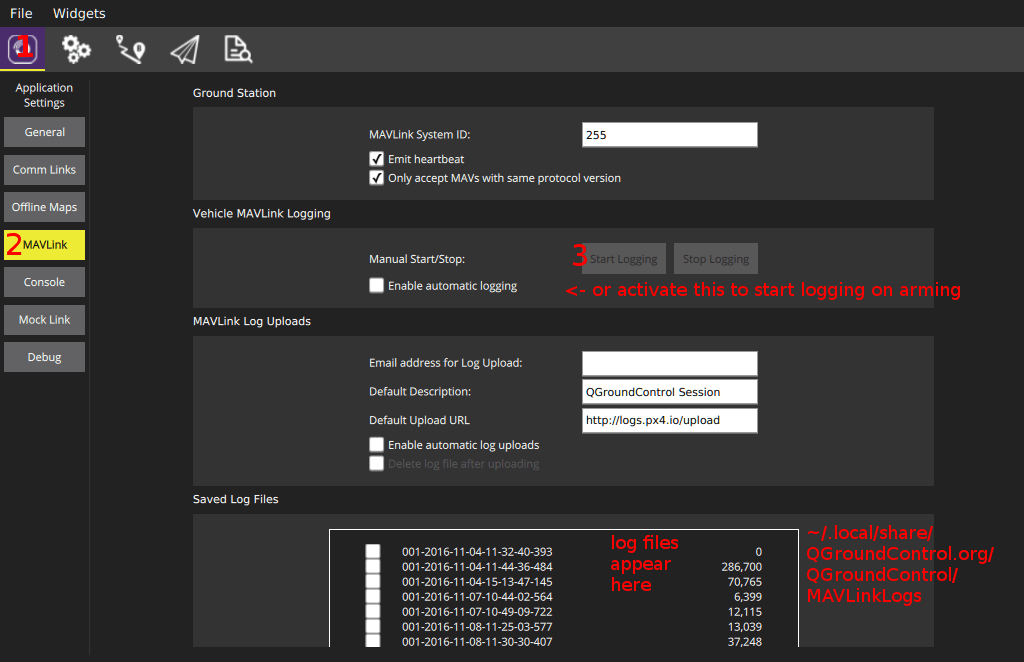
mavlink_ulog_streaming.pyscript in PX4-Autopilot/Tools.- QGroundControl:
- MAVGCL
Діагностика
If log streaming does not start, make sure the
loggeris running (see above), and inspect the console output while starting.Якщо це все ще не працює, переконайтеся, що використовується MAVLink 2.
MAV_PROTO_VERneeds to be set to 2.Log streaming uses a maximum of 70% of the configured MAVLink rate (
-rparameter). Якщо потрібно більше, повідомлення видаляються. The currently used percentage can be inspected withmavlink status(1.8% is used in this example):shinstance #0: GCS heartbeat: 160955 us ago mavlink chan: #0 type: GENERIC LINK OR RADIO flow control: OFF rates: tx: 95.781 kB/s txerr: 0.000 kB/s rx: 0.021 kB/s rate mult: 1.000 ULog rate: 1.8% of max 70.0% accepting commands: YES MAVLink version: 2 transport protocol: UDP (14556)Also make sure
txerrstays at 0. Якщо це піде вгору, або буфер відправлення NuttX занадто малий, або фізичний зв'язок насичений, або апаратне забезпечення занадто повільне для обробки даних.