
ARK DIST SR
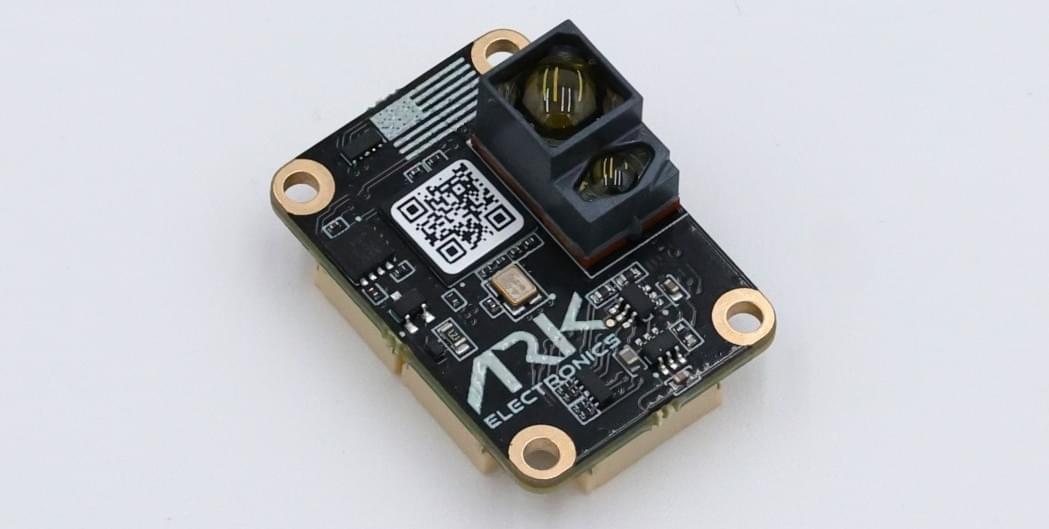
ARK DIST SR is a low range, open source DroneCAN distance sensor. It has an approximate range of between 8cm to 30m.
Де купити
Замовте цей модуль з:
- ARK Electronics (US)
Характеристики обладнання
- Open Source Schematic and BOM
- Датчики
- Broadcom AFBR-S50LV85D Time-of-Flight Distance Sensor
- Типовий діапазон відстані до 30м
- Інтегроване джерело світла лазера 850 нм
- Поле зору (FoV) 12,4° x 6,2° з 32 пікселями
- Робота в умовах 200 тис. люксів світла навколишнього середовища
- Reference Pixel for system health monitoring
- Добре працює на всіх поверхнях
- Трансмітер пучка 2° x 2° для підсвічування між 1 та 3 пікселями
- Broadcom AFBR-S50LV85D Time-of-Flight Distance Sensor
- Два роз'єми стандарту CAN для Pixhawk (4 контакти JST GH)
- Pixhawk Standard UART Connector (6 Pin JST SH)
- Роз'єм для відлагодження стандарту Pixhawk (6 контактів JST SH)
- Малий форм-фактор
- 2.0cm x 2.8cm x 1.4cm
- 4g
- LED індикатори
- USA Built
- NDAA Compliant
- Вимоги до живлення
- 5v
- 84mA Average
- 86mA Max
- 5v
Налаштування програмного забезпечення
Підключення
The ARK DIST is connected to the CAN bus using a Pixhawk standard 4 pin JST GH cable. For more information, refer to the CAN Wiring instructions.
The ARK DIST can also be connected with UART and communicates over MAVLink sending the DISTANCE_SENSOR message.
Налаштування прошивки
ARK DIST SR runs the PX4 DroneCAN Firmware. As such, it supports firmware update over the CAN bus and dynamic node allocation.
Конфігурація PX4
DroneCAN
Увімкнути DroneCAN
Кроки наступні:
- In QGroundControl set the parameter UAVCAN_ENABLE to
2for dynamic node allocation (or3if using DroneCAN ESCs) and reboot (see Finding/Updating Parameters). - Connect ARK DIST SR CAN to the Pixhawk CAN.
Після активації модуль буде виявлено при завантаженні. Distance sensor data should arrive at 40Hz.
DroneCAN configuration in PX4 is explained in more detail in DroneCAN > Enabling DroneCAN.
CAN Configuration
First set the parameters to Enable DroneCAN (as shown above).
Set the following parameters in QGroundControl:
- Enable UAVCAN_ENABLE to 2 for dynamic node allocation.
- Enable UAVCAN_SUB_RNG.
- Set EKF2_RNG_QLTY_T to
0.2. - Set UAVCAN_RNG_MIN to
0.08. - Set UAVCAN_RNG_MAX to
30.
See also Distance Sensor/Range Finder in DroneCAN > Subscriptions and Publications.
UART/MAVLink Configuration
If connecting via a UART set the following parameters in QGroundControl:
- Set MAV_X_CONFIG to the port the sensor is connected to.
- Set MAV_X_FORWARD to
0(off). - Set MAV_X_MODE to
7or13to (Minimal or Low Bandwidth) to reduce memory usage. - Set
SER_XXX_BAUDto115200, whereXXXis specific to the port you are using (such as SER_GPS2_BAUD). - Set EKF2_RNG_QLTY_T to
0.2.
Дивіться також
- ARK DIST SR (ARK Docs)